Hello. Newbie issue: Help wanted for a technological dummy.
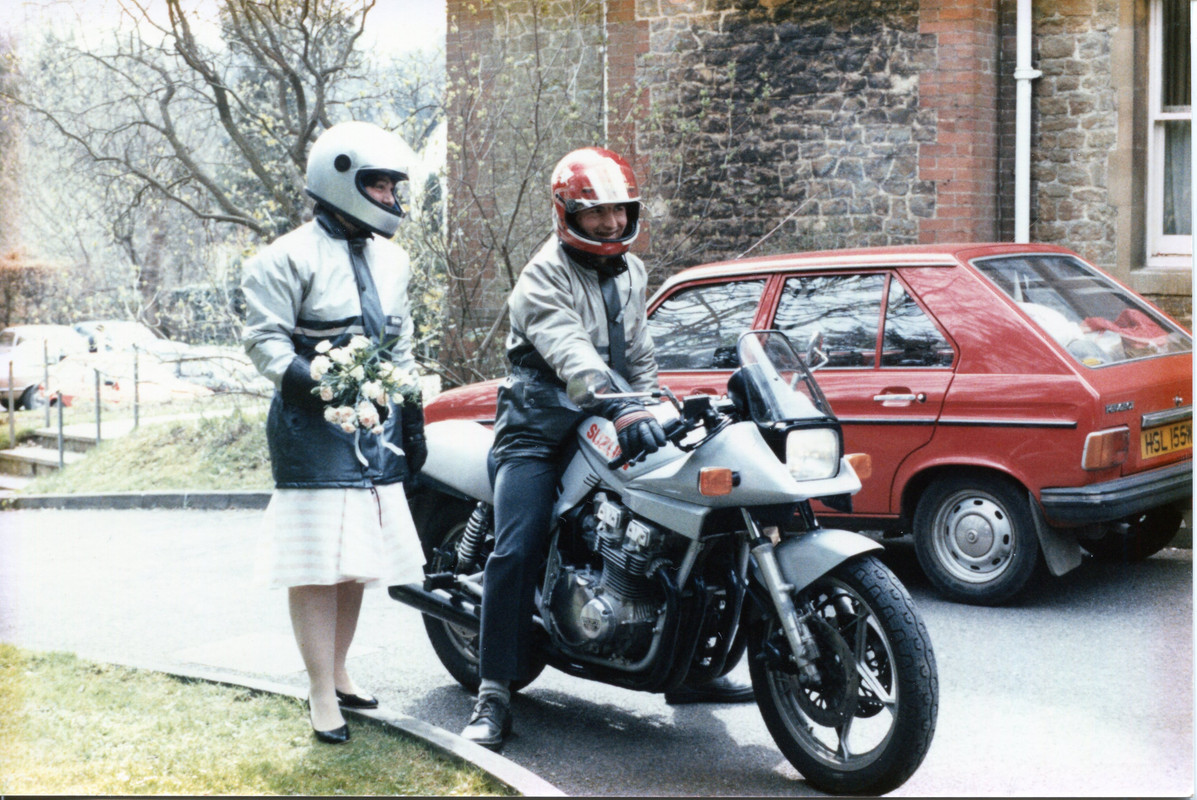
I have had some of my Katana photos scanned as .jpg files.
I have uploaded them to a PostImage account. So far so good.
I tried linking the album to a new post here, putting the web link in between the Album tags (these things [album][/album]).What came out was just a hyperlink to the album. If I then clicked on that it showed the photos as thumbnails, but it also showed my logon details, and that I was logged on. I deleted the post so that my PostImage account cannot be fiddled about with.
I have searched the forum FAQs for photo posting advice without luck.
Please could someone tell me how to link to my PostImage photos so that appear here in the same way as other peoples photos. I.E. a small image in the post that enlarges to the full sized image when it is clicked on.
Many thanks.
David
Wanted, a dummy's guide to posting images
-
GSF34058
- Posts: 113
- Joined: Tue Jul 21, 2020 12:24 pm
- Location: Guildford
- Has thanked: 32 times
- Been thanked: 60 times
Re: Wanted, a dummy's guide to posting images
OK. Here's a test.
[img]file:///home/lordlucan/Pictures/Desktop/Kat%20scans/Leaving%20the%20Register%20Office%201986.jpg[/img]
Edit. No that did not work. Another forum I use enables me to upload a photo to the forum server. I can't see how to do this here. If I right click on, and then copy the image, and post it between the img tags I get what shows above.
Another try: [image]file:///home/lordlucan/Pictures/Desktop/Kat%20scans/Leaving%20the%20Register%20Office%201986.jpg[/image]
And again
https://i.postimg.cc/mhxtjRSr/Leaving-t ... e-1986.jpg
[image]https://i.postimg.cc/mhxtjRSr/Leaving-t ... e-1986.jpg[/image]
Oooh. That sort of worked. But how do I get the thumbnail photo to show here?
[img]file:///home/lordlucan/Pictures/Desktop/Kat%20scans/Leaving%20the%20Register%20Office%201986.jpg[/img]
Edit. No that did not work. Another forum I use enables me to upload a photo to the forum server. I can't see how to do this here. If I right click on, and then copy the image, and post it between the img tags I get what shows above.
Another try: [image]file:///home/lordlucan/Pictures/Desktop/Kat%20scans/Leaving%20the%20Register%20Office%201986.jpg[/image]
And again
https://i.postimg.cc/mhxtjRSr/Leaving-t ... e-1986.jpg
[image]https://i.postimg.cc/mhxtjRSr/Leaving-t ... e-1986.jpg[/image]
Oooh. That sort of worked. But how do I get the thumbnail photo to show here?
Nothing screams poor workmanship quite like wrinkles in your duct tape.
-
Kryten

- Club Member
- Posts: 1828
- Joined: Sun Dec 26, 2010 11:13 pm
- Location: North Norfolk
- Has thanked: 128 times
- Been thanked: 269 times
Re: Wanted, a dummy's guide to posting images
Hmmm. Clearly something missing........

Jim
750 SZ (Not So) Skruffy Kat
1000 SZ Nearly there!
7/11 SZ Back of the shed
T509 SpeedTrip
It was a New Day yesterday but, by God, it's an Old Day now!
750 SZ (Not So) Skruffy Kat
1000 SZ Nearly there!
7/11 SZ Back of the shed
T509 SpeedTrip
It was a New Day yesterday but, by God, it's an Old Day now!
-
Lexdba

- Club Member
- Posts: 247
- Joined: Mon May 11, 2020 7:25 am
- Location: Tulip country
- Has thanked: 44 times
- Been thanked: 78 times
-
Kryten
- Club Member
- Posts: 1828
- Joined: Sun Dec 26, 2010 11:13 pm
- Location: North Norfolk
- Has thanked: 128 times
- Been thanked: 269 times
Re: Wanted, a dummy's guide to posting images
Go to “Full editor and Preview” when posting.
Below the 3 Choice Buttons <Save Draft> <Preview> and <Submit> are 2 tabs.
Click on <Attachments>
Click on <Add Files> I then get a choice of <Take Photo> <Photo Library> or <Browse> because I am using an iPad.
I use browse.
iPad takes me to <Recents> (mostly because I take photos on my Android phone and the have to download them to IOS)
Select your photo
And then I use <place inline> to put the photo on the left hand side
Like this...
Biggest chew tends to be the image size limit that the board has. But you could always use an image re-sizer app.
Below the 3 Choice Buttons <Save Draft> <Preview> and <Submit> are 2 tabs.
Click on <Attachments>
Click on <Add Files> I then get a choice of <Take Photo> <Photo Library> or <Browse> because I am using an iPad.
I use browse.
iPad takes me to <Recents> (mostly because I take photos on my Android phone and the have to download them to IOS)
Select your photo
And then I use <place inline> to put the photo on the left hand side
Like this...
Jim
750 SZ (Not So) Skruffy Kat
1000 SZ Nearly there!
7/11 SZ Back of the shed
T509 SpeedTrip
It was a New Day yesterday but, by God, it's an Old Day now!
750 SZ (Not So) Skruffy Kat
1000 SZ Nearly there!
7/11 SZ Back of the shed
T509 SpeedTrip
It was a New Day yesterday but, by God, it's an Old Day now!
-
GSF34058
- Posts: 113
- Joined: Tue Jul 21, 2020 12:24 pm
- Location: Guildford
- Has thanked: 32 times
- Been thanked: 60 times
Re: Wanted, a dummy's guide to posting images
Another test. My old 650G
It's working!!!!!! Thanks a million Lexdba and Kryten. I have no idea why I could not or rather did not see the 'attachments' tab before.

David
It's working!!!!!! Thanks a million Lexdba and Kryten. I have no idea why I could not or rather did not see the 'attachments' tab before.
David
- Attachments
-
Nothing screams poor workmanship quite like wrinkles in your duct tape.
-
GSF34058
- Posts: 113
- Joined: Tue Jul 21, 2020 12:24 pm
- Location: Guildford
- Has thanked: 32 times
- Been thanked: 60 times
Re: Wanted, a dummy's guide to posting images
Yes. Back in the late 1970s, when I was at college in Devon, in the days when you could safely leave your crash helmet unlocked on the bike saddle, I saw a sticker on someone's helmet that said "I've seen Lord Lucan". It amused me a lot, and I have been using Lord Lucan sightings and gags ever since.
I think my personal best was when I was in Portsea, near Melbourne in Australia. I put the following comment in the Monash Light Lookout visitors book. "I've just seen Harold Holt, (signed) Lord Lucan".
Childish I know, but that's my sense of humour.
I also went swimming at the Harold Holt swim centre.
David.
Nothing screams poor workmanship quite like wrinkles in your duct tape.

-
Bikeazoid
- Posts: 322
- Joined: Fri Mar 27, 2020 5:45 pm
- Location: California
- Has thanked: 140 times
- Been thanked: 55 times
- Contact:
Re: Wanted, a dummy's guide to posting images
82 Katana 1000 (work in progress, but she will be beautiful she has a dedicated sugar daddy)
2010 Z1000 (50k miles, I think that is like 60 Kilometer's or so)
www.CreepyKat.com
www.thepryorhouse.com
2010 Z1000 (50k miles, I think that is like 60 Kilometer's or so)
www.CreepyKat.com
www.thepryorhouse.com
-
Bikeazoid
- Posts: 322
- Joined: Fri Mar 27, 2020 5:45 pm
- Location: California
- Has thanked: 140 times
- Been thanked: 55 times
- Contact:
Re: Wanted, a dummy's guide to posting images
Haaay! That video did it! Thanks guys
82 Katana 1000 (work in progress, but she will be beautiful she has a dedicated sugar daddy)
2010 Z1000 (50k miles, I think that is like 60 Kilometer's or so)
www.CreepyKat.com
www.thepryorhouse.com
2010 Z1000 (50k miles, I think that is like 60 Kilometer's or so)
www.CreepyKat.com
www.thepryorhouse.com